


You can stop most electric toothbrush subscriptions in a few minutes through your account’s subscription manager, canceling before the next billing cutoff so you avoid another charge. Success looks like two things: a confirmation email and a subscription status that reads “canceled” or “inactive” when you check your account. If the cancel button is hidden or support is slow, pausing or skipping the next shipment gets you the same immediate relief without closing the account entirely.
TL;DR:
- Cancelling before the billing cutoff usually prevents the next charge, but any shipment already in transit may still bill or ship if the cutoff was missed.
- If the cancel button is hidden, support can be contacted directly by email, phone, or support forms, with documentation needed for future disputes.
- Pausing, skipping, or rescheduling shipments can solve timing issues when full cancellation is unnecessary or inconvenient.
- Deleting your account permanently removes data but does not typically stop future charges, so cancel the subscription first if you just want to stop payments.
- Watching how users actually manage subscriptions reveals that cancellation links are often buried, so checking support FAQs or contacting support proactively simplifies the process.
Table of Contents
- How Do I Cancel My Toothbrush Subscription Online?
- What If I Can’t Find the Cancel Button?
- Will Canceling Stop My Next Charge or Shipment?
- What Do I Do About a Charge After I Already Canceled?
- Should I Cancel, Pause, or Just Skip a Shipment?
- Should I Cancel My Subscription or Delete My Account Entirely?
- What Y-brush Has Learned From Managing Subscriptions
- An Editorial Take on Why Cancellation Feels Harder Than It Should
- Looking for a Subscription That Fits Your Routine Better?
- Where to Verify Brand Policies and Cancellation Steps
- Sources
- FAQ
How Do I Cancel My Toothbrush Subscription Online?
The fastest way to cancel a toothbrush plan, whether it’s Quip, Y-brush, or another direct-to-consumer oral care brand, is through your account dashboard. Most subscription services build this flow the same way, because the underlying subscription software they run on shares common patterns. Consumer Reports notes that most electric toothbrush subscription services let customers change or cancel plans directly through their account, though how easy that process feels varies a lot from brand to brand.
Here’s the step-by-step version that works across nearly every toothbrush subscription cancellation process:
- Log in using the email tied to your billing. This trips people up more than anything else. If you subscribed through Apple Pay, a gift purchase, or a family member’s email, log in with that exact address, not the one you check every day.
- Navigate to Account or My Account, then find Subscriptions. Depending on the brand, this menu might be labeled “Manage Subscriptions,” “Auto Ship,” or “Recurring Orders.” They all mean the same thing.
- Select the active subscription you want to stop. If you have more than one, be careful here. Households often run separate plans for adult and kids’ brush heads, and canceling the wrong one leaves the real problem unsolved.
- Click “Manage” or “View Details” to reveal the cancel option. This is the step most people miss. Brands design these dashboards to highlight “Pause” or “Skip” prominently, because those options keep you subscribed. The actual cancel link is usually one click deeper, tucked inside a details view or a dropdown menu.
- Choose “Cancel” or “Cancel Subscription” and confirm. You’ll likely see a short survey asking why you’re leaving. Answering it, or skipping it, doesn’t affect whether the cancellation goes through. Click “Confirm” or “Next” to finalize it.
- Save your proof. Screenshot the confirmation page. Then check your inbox for a cancellation confirmation email, and hold onto it. This single email becomes your best evidence if a charge slips through later.
- Check your next scheduled billing date. Compare it against when you canceled. If your cancellation landed after the processing cutoff, the shipment already in motion will likely still bill and ship.
Brand subscription policies commonly instruct customers to follow this exact sequence: log in, go to Subscriptions, select the plan, and click “Cancel Subscription.” The one detail that trips up nearly everyone is timing. Canceling stops future charges. It does nothing to unwind a charge or shipment that already processed.
Pro Tip: Set a phone reminder for three days before your next expected billing date each cycle. That buffer gives you enough room to cancel, pause, or skip before the order locks in, instead of scrambling the morning after a charge hits your card.
Third-party walkthroughs of major brands’ cancellation flows confirm this same pattern: log in, find Manage Subscriptions, select the plan, cancel, then confirm. The process rarely takes more than five minutes once you’re in the right menu.
What If I Can’t Find the Cancel Button?
Some subscription dashboards genuinely bury the cancel option, and it isn’t always by accident. Practitioner observation of D2C oral care platforms shows many prioritize “Save” or “Pause” prompts, pushing “Cancel” into a submenu under “Manage” or “View Details.” If you’ve dug through your account and still can’t find it, here’s how to force the issue through other channels.
- Check the help center first. Most brands maintain a dedicated FAQ or support page listing exact cancellation steps, and some, like Gleam Toothbrush’s FAQ, publish a direct contact route specifically for cancellation requests when the dashboard option isn’t available.
- Email support directly, using the address printed on your billing receipt or order confirmation. Include your account email, your order or subscription number, the last four digits of the payment method on file, and a clear, direct sentence: “Please cancel my subscription and confirm no future charges will be billed to this account.”
- Use a contact form if no direct email is listed. Fill in the same details. Vague requests get vague responses, so specificity here saves you a round of back-and-forth.
- Give it 48 to 72 hours, which is the typical response window for brand support teams handling these requests. If you hear nothing by then, follow up on the same email thread with the subject line “Cancellation Follow-Up” and paste your original message below it.
- Call if the brand offers phone support. Ask for the agent’s name and request a cancellation reference number before you hang up. Then send a short follow-up email restating what the agent confirmed, so you have it in writing.
Keeping a written record matters more than it seems like it should. Consumer complaint boards and review sites document real cases of delayed responses and confusing dashboard menus tripping up cancellation attempts, and those same threads tend to show that people who kept confirmation emails resolved billing disputes faster than those who didn’t.
Will Canceling Stop My Next Charge or Shipment?
It depends entirely on timing. Most subscriptions run on a fixed billing cadence, monthly, every two months, or quarterly, and that cadence has a processing cutoff. Cancel before that cutoff, and the next charge never happens. Cancel after it, and the order is already in motion.
Some brands are explicit about this window. Toothbrush Express’s auto-ship help page recommends canceling at least 10 days before your next scheduled shipment to guarantee you avoid the charge, and many brands send a reminder email a few days ahead of billing for exactly this reason. Read that email. It’s your last clean opportunity to cancel, pause, or skip before money moves.
A few things to keep in mind once billing has already occurred:
- If an order already shipped, it typically can’t be pulled back. Check the brand’s return policy for unopened items instead of assuming a refund is automatic.
- Refunds for past billing cycles are uncommon. Brands generally treat “you were charged and it shipped” as a completed transaction unless the product arrived damaged or the wrong item showed up.
- Damaged or missing items usually qualify for a refund or replacement, but only if you report it within the vendor’s stated window, often 14 to 30 days depending on the brand.
- If you’re charged after you’ve genuinely canceled, that’s different from a shipment already in progress. Pull your confirmation email and account screenshot, send both to support, and request a refund directly. If support doesn’t resolve it, dispute the charge with your card issuer. Card issuers generally side with customers who can show a dated cancellation confirmation.
What Do I Do About a Charge After I Already Canceled?
This is the scenario that generates the most frustration, and it’s usually fixable once you know where to look. Start by pulling up your cancellation confirmation email and a screenshot of your account showing “inactive” status. Send both to support with a direct refund request. Most brands process this within a few business days once they see documented proof the cancellation happened before the charge.
A handful of other issues come up often enough to walk through separately:
- Missing cancel link: Try the brand’s website in a different browser instead of the mobile app, since some cancellation flows are web-only. Search the page for “Manage Subscriptions” or “View Details” rather than scanning for a button labeled “Cancel.”
- Charged after canceling: Gather your confirmation email and account screenshot, then request a refund from support. If they don’t respond or resolve it within a reasonable window, escalate to your payment provider with the same documentation.
- Multiple or shared family accounts: Check the email address tied to each order confirmation you’ve received. Family subscriptions often get set up under whichever parent’s email happened to be on hand during checkout, and canceling the wrong account changes nothing.
- Slow support response: If email and phone support stall, try the brand’s social media accounts. A direct message on Instagram or X often gets a faster reply than a support ticket, and it creates its own timestamped record of when you reached out.
Pro Tip: Keep every piece of communication in one email folder labeled with the brand name and “cancellation.” When you’re disputing a charge weeks later, having a clean, dated trail saves you from hunting through your inbox under pressure.
Should I Cancel, Pause, or Just Skip a Shipment?
Full cancellation isn’t always the right move, especially if the real problem is timing rather than wanting to stop altogether. Three lighter options exist inside most subscription dashboards, and each solves a different version of the same headache.
- Skip a shipment when you have enough brush heads on hand and just need to bypass the next delivery. Your subscription stays fully active, and billing resumes on the following cycle automatically.
- Pause the subscription when you need a longer break, say, you’re traveling for two months or switching toothbrushes temporarily. Pausing stops both shipments and billing for a set window you choose, and most dashboards let you set a resume date in advance.
- Reschedule the next delivery when your stock timing is just slightly off. Moving a shipment back two or three weeks often solves the problem without touching your subscription status at all.
Each of these shows up differently in your account. Skipped shipments usually display as “Skipped” next to the upcoming delivery date. Paused subscriptions typically show a “Paused” status with a resume date listed. Rescheduled orders simply reflect the new delivery date on your next-shipment line. Check that status change immediately after making it, the same way you’d confirm a full cancellation, since a skip or pause that didn’t save properly will bill you anyway.
Should I Cancel My Subscription or Delete My Account Entirely?
These are two different actions with two different consequences, and mixing them up creates problems you don’t need. Canceling a subscription stops future shipments and billing but leaves your account, order history, and any warranty coverage intact. Deleting your account removes your personal data from the brand’s system, and depending on the company, that can also wipe your order history and any warranty tied to a serial number or purchase date.
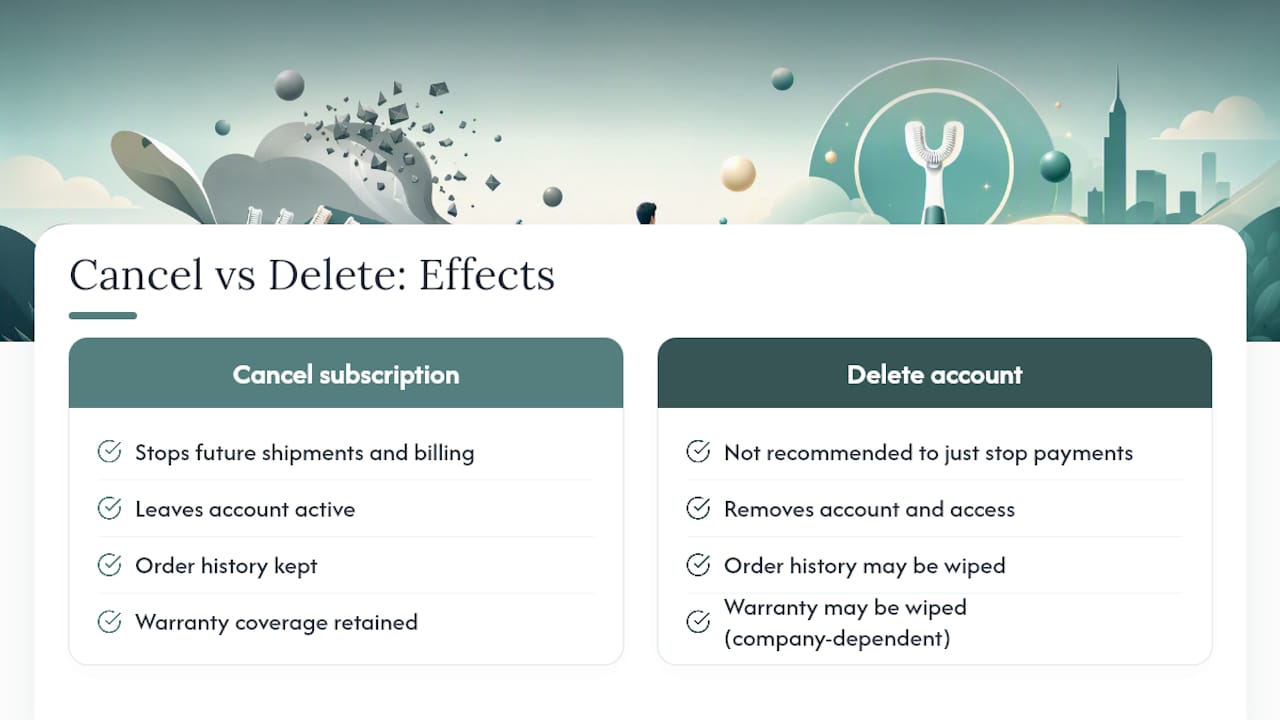
If your only goal is to stop paying, cancel the subscription and leave the account alone. If you specifically want your data removed, contact support and ask for account deletion, and request written confirmation of exactly what gets erased versus what the brand retains for legal or accounting purposes. Most companies keep some transaction records regardless of deletion requests, for tax and fraud prevention reasons.
One rule of thumb: if you ever think you might want a warranty claim, a reorder, or proof of purchase down the line, cancel rather than delete. Account deletion is close to irreversible on most platforms, while cancellation can be undone with a few clicks if you change your mind.
What Y-brush Has Learned From Managing Subscriptions
Watching how people actually use subscription toothbrush plans, rather than how brands assume they use them, is different than most guides suggest. Y-brush is built around a simple premise: a full clean shouldn’t take the two full minutes dentists recommend and that 90% of people skip in practice, so the Y-shaped brush head delivers a complete clean in about 20 seconds using sonic vibrations. That design choice extends into how the subscription itself works.
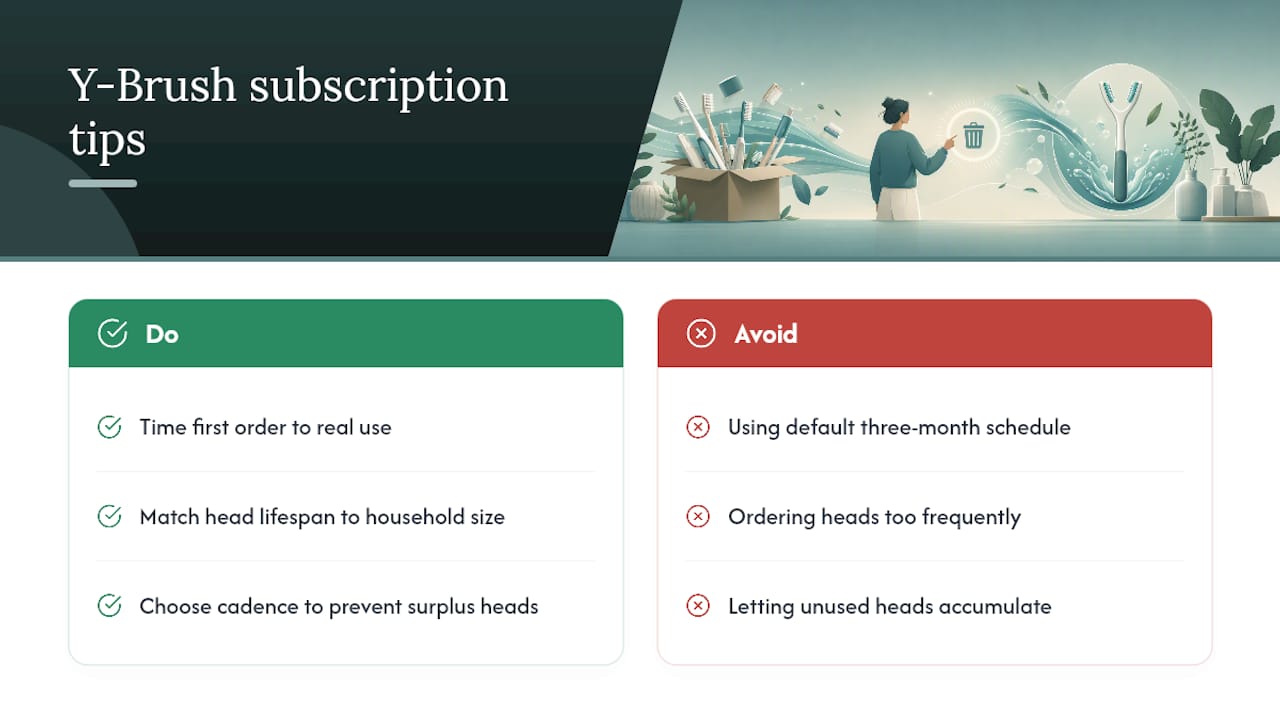
Some toothbrush brands offer multiple models and flexible subscription cadences, letting subscribers match replacement head shipments to how quickly their household actually goes through them rather than a fixed schedule that doesn’t fit real habits. A few practical tips worth applying regardless of which brand you use: time your first replacement-head order to match your actual brushing frequency rather than a generic three-month default, compare the head’s expected lifespan against how many people in your household are using it, and pick a delivery cadence that avoids ending up with a drawer full of unused heads.
An Editorial Take on Why Cancellation Feels Harder Than It Should
Most subscription cancellation friction isn’t accidental. Dashboards are built by product teams whose incentive is retention, so “Pause” gets a big button and “Cancel” gets buried two clicks deep in a “Manage” submenu. That’s not a conspiracy, it’s just how conversion-optimized software tends to get built. Knowing that changes how you approach the problem: stop hunting for a button labeled exactly “Cancel” and start clicking into “View Details” or “Manage,” because that’s almost always where it lives.
The bigger mistake I see people make is treating cancellation as instant and permanent the moment they click confirm. It isn’t. Save the confirmation email. Check your next billing date against today’s date. If support is handling your request manually rather than through a dashboard, don’t consider it done until you have something in writing. And if you’re on the fence rather than fully done, try pausing or skipping first. It costs you nothing and it’s reversible, which full cancellation sometimes isn’t in practice, even when it should be in theory.
— Joris
Looking for a Subscription That Fits Your Routine Better?
If the reason you’re canceling is really about fit, a plan that doesn’t match how fast you go through brush heads, a brushing time that never quite happens, or a cadence that leaves you buried in extra heads, switching is often simpler than fixing the old subscription. Y-brush’s subscription plan lets you choose a replacement head cadence that matches your actual usage, built around a Y-shaped head and a 20-second sonic clean designed to fit into a routine you’ll actually stick to.
Managing it is meant to stay simple: adjust, skip, or update your plan directly from your account without digging through hidden menus. Families switching from adult-only plans can also set up a children’s model built for ages 4 to 12 on its own cadence. If you’re ready to see whether a shorter brushing time and a flexible subscription actually solves the problem your old plan didn’t, start with the Y-brush Essential Sonic Toothbrush and set up delivery on your terms.
Where to Verify Brand Policies and Cancellation Steps
For a broader look at how electric toothbrush subscriptions compare across brands, Consumer Reports’ overview covers user experiences with cancellation ease and subscription management across several major players. Brand-specific subscription policies, like Mouthology’s published terms, show how companies typically word their cancellation rules and billing cutoffs. For a practical walkthrough of one brand’s exact cancellation flow, this step-by-step guide breaks down the dashboard navigation in detail, and Toothbrush Express’s auto-ship page offers a useful model for how far ahead of a shipment date you should plan to cancel.
Sources
- Electric Toothbrush Subscription FAQ | Burst, Quip
- Subscription Policy | Mouthology
- How To Cancel Quip Subscription? Step By Step
- How To Cancel Auto-Ship
FAQ
How Do I Cancel My Quip Subscription?
Log into your Quip account, go to the Subscriptions or Manage Subscriptions section, select your active plan, and click “Cancel Subscription,” confirming through any prompts that follow. Save the confirmation email and check your account status afterward to make sure it shows as canceled or inactive.
How Much Does a Quip Subscription Typically Cost?
Subscription pricing varies by brush model, head type, and delivery frequency, and it can change over time, so the exact current cost is best confirmed directly on the brand’s account or pricing page rather than assumed from older figures.
How Can I Delete My Quip Account Entirely?
Deleting an account is different from canceling a subscription. Contact support directly to request account deletion, and ask for written confirmation of what data gets erased versus retained, since deletion may also remove order history and warranty access.
How Do I Cancel a Suri Toothbrush Subscription?
Suri’s cancellation process follows the same general pattern used across most toothbrush subscription services: log in, locate Manage Subscriptions in your account, select the plan, and choose the cancel option, contacting support directly if that option isn’t visible.
What Counts as Proof That My Cancellation Went Through?
A cancellation confirmation email and an account dashboard showing “canceled” or “inactive” status are the two forms of proof worth saving, since both help resolve any billing dispute if a charge slips through afterward.


